Stop Pasting Secrets Into AI Agents
Token Vault is a credential manager built for the AI-agent era. Store your API keys and OAuth tokens in a vault only your webhook can open, then let your agents access them through secure proxies and scoped grants, without ever seeing the real secrets.
Free to use. Read our Privacy Policy and Terms of Service.
What is Token Vault?
A credential manager built for the AI-agent era. Store your keys and tokens in a vault your webhook holds the key to, then let your agents access them through secure proxies and scoped grants, without ever seeing the real secret.
Read the architecture overviewYour Tokens, Your Rules
Every credential you store is protected by choices you make: where it lives, how it's encrypted, and who can refresh it. Your webhook owns the key — Token Vault holds only opaque blobs it cannot read.
Webhook-Sovereign Storage
Your tokens live on your own server. Token Vault only ever holds opaque blobs and metadata.
Zero-Knowledge
Default
Your webhook owns the key and serves credentials directly. Token Vault can never read them — it issues a short-lived signed ticket and redirects the agent's request directly to your server.
- Key never leaves your server
- Direct webhook-to-agent delivery
- Your webhook is the kill switch
Token Vault OAuth
Built-in OAuth
Built-in OAuth (Google, GitHub) redirects through Token Vault to complete the handshake. Tokens pass through in transit only and land on your webhook — Token Vault never persists them.
- Agents never see a 401
- Nothing stored at rest in TV
- Webhook stays the kill switch
Token Refresh
OAuth tokens expire. Token Vault makes sure your agents never notice.

Just-in-Time Refresh
When an agent or MCP proxy requests a token that has expired, Token Vault automatically uses the stored refresh token to get a fresh access token from the OAuth provider before returning it. Your agents never see a 401. They always get a working credential.
Token Vault OAuth
For tokens created via Token Vault's built-in OAuth (Google, GitHub), when your webhook opts in, Token Vault briefly receives the refresh token in transit, exchanges it with the provider, and sends new tokens back to your webhook for storage. Credentials are in transit only — never stored by Token Vault.
Webhook-Delegated Refresh
For custom tokens where your webhook owns the OAuth credentials, Token Vault sends a refresh notification and your webhook handles the exchange entirely. Token Vault never sees any credential material. The request includes an urgent: true flag when an agent is actively waiting, so you can prioritize.
The Kill Switch
In webhook mode, you have absolute control over your credentials.
Your server owns the encryption key. Taking your webhook offline instantly disables all access to your tokens:
This is by design. No one — not Token Vault, not an attacker who compromises our servers — can access your tokens without your webhook's cooperation. Bring it back online and everything resumes instantly.
Give AI Agents Exactly What They Need
Create agent identities, grant them scoped access to specific tokens with time limits, and revoke access instantly. Your agents call a simple HTTP endpoint. No SDK required.
See how scoped agent grants work
Creating Agents
Register an identity for each AI agent, script, or service that needs credentials.
Create in Dashboard
Name your agent (e.g., “Claude Code”, “CI Pipeline”) and add an optional description.
Copy the API Key
You get a unique key like tvagent_abc123.... It's shown once, so save it securely.
Use Anywhere
Pass the key via Authorization: Bearer header,x-agent-key header, or ?key= query param.
Time-Scoped Token Grants
Grant access to specific tokens with automatic expiry. Choose a time limit and auto-refresh policy.
Pick a token
Choose which vault credential the agent can access (e.g., github,openai). Each grant is for one token.
Set a time limit
1 hour, 8 hours, 7 days, 30 days, or “Until revoked”. Grants expire automatically. The agent gets a clear error on its next request.
Auto-refresh (optional)
For OAuth tokens, enable auto-refresh so the agent always gets a valid access token, even if the original has expired.
Real-time vault fetch
Credentials are never stored in the grant. Each agent request triggers a fresh credential fetch — your webhook delivers the credential directly to the agent, so the kill switch works instantly.
Revoking Access
Remove an agent's access instantly from the dashboard.
Open the agent's detail page and click Revoke on any grant, or deactivate the entire agent. The change is immediate. The very next API call from that agent returns a 403 Forbidden. No propagation delay, no cache window.
You can also delete the agent entirely, which removes all grants and invalidates the API key permanently.
Code Examples
Integrate Token Vault credentials into your agents in a few lines of code.
import requests
from google.adk import Agent

TOKENVAULT_URL = "https://api.tokenvault.uk/api/agents/credentials"
AGENT_KEY = "tvagent_abc123..."  # store in env var in production

def get_credential(service: str) -> str:
    """Fetch a fresh credential from Token Vault."""
    resp = requests.get(
        TOKENVAULT_URL,
        params={"service": service},
        headers={"Authorization": f"Bearer {AGENT_KEY}"},
    )
    resp.raise_for_status()
    return resp.json()["accessToken"]

# Build an ADK agent that uses Token Vault for credentials
agent = Agent(
    name="code_reviewer",
    model="gemini-2.0-flash",
    instruction="""You are a code review assistant.
    Use the github tool to read pull requests and leave review comments.""",
)

@agent.tool
def github_api(endpoint: str, method: str = "GET", body: str = ""):
    """Call the GitHub API with a fresh token from Token Vault."""
    token = get_credential("github")
    resp = requests.request(
        method,
        f"https://api.github.com{endpoint}",
        headers={
            "Authorization": f"Bearer {token}",
            "Accept": "application/vnd.github.v3+json",
        },
        json=body if body else None,
    )
return resp.json()A Secure Proxy for AI Agent Connections
AI agents like Cursor, Windsurf, and Claude need API credentials to connect to external MCP servers. The problem? You have to paste your real tokens into their config files, in plaintext. The MCP proxy sits between your agent and the upstream service: Token Vault forwards each request to your webhook, which injects the real credential server-side — so neither the agent nor Token Vault ever sees it.
See how the MCP proxy secures agent connectionsThe Problem
Without an MCP proxy, your tokens live in plaintext config files on every machine that runs an agent.
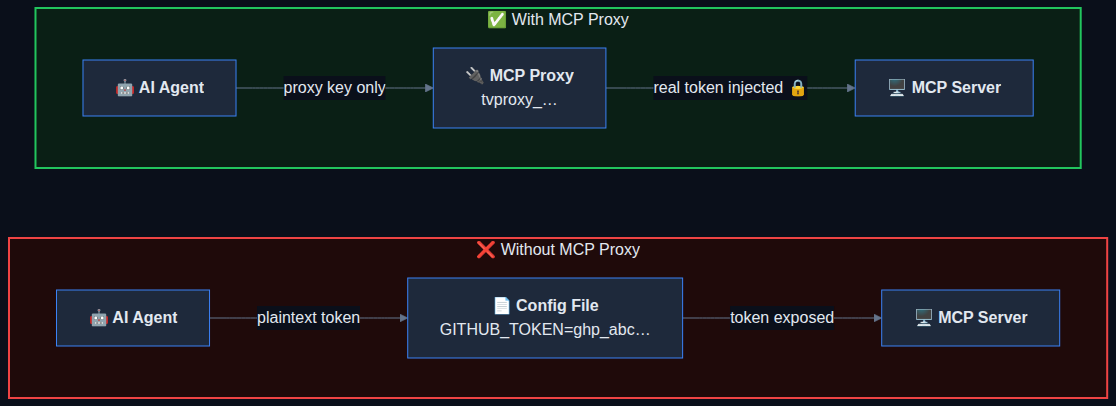
Without MCP Proxy
- Real API keys in plaintext config files
- Every machine has a copy of your secrets
- No way to revoke without changing the token everywhere
- Expired tokens break the agent silently
With MCP Proxy
- Agent only gets a proxy key (random, revocable)
- Real token injected server-side, never exposed
- Revoke the proxy key in one click from the dashboard
- Expired tokens refreshed automatically before forwarding
Proxy Templates
One-click templates for popular MCP servers. Or import any MCP config JSON.
GitHub
Proxy GitHub API and MCP server requests with your stored GitHub token.
Slack
Connect AI agents to Slack workspaces through a secure proxy.
Linear
Proxy Linear project management API calls with injected auth.
Notion
Connect to Notion workspaces without exposing your integration token.
Jira
Proxy Atlassian Jira requests with your stored API token.
Custom / Import JSON
Paste any MCP config JSON and Token Vault extracts the URL and headers.
Have a custom MCP config? Use the Import JSON tab in the create dialog. Paste any { "mcpServers": { ... } } snippet and Token Vault extracts the URL and headers automatically.
Example: Cursor + GitHub MCP
Proxy your Cursor IDE's GitHub MCP connection through Token Vault in 2 minutes.
Create the proxy
In the MCP Proxy tab, select the GitHub template. Choose your stored GitHub token. Token Vault generates a proxy URL with a unique key.
Paste into Cursor
Copy the generated JSON config and paste it into Cursor's MCP settings.
{
  "mcpServers": {
    "github": {
      "url": "https://api.tokenvault.one/api/proxy/mcp?key=tvproxy_k8Xm2...",
      "headers": {}
    }
  }
}
Notice the empty headers. Cursor never sees your GitHub token — Token Vault forwards the request to your webhook, which injects it server-side. Not even Token Vault sees the token. If it expires, it's refreshed automatically before Cursor even notices.